External CS2 software that feels good to use.

combat tab

Features

It's all per-weapon where it counts, and every colour, key and toggle is yours to set. Hover any row for the details.

Weapon profiles

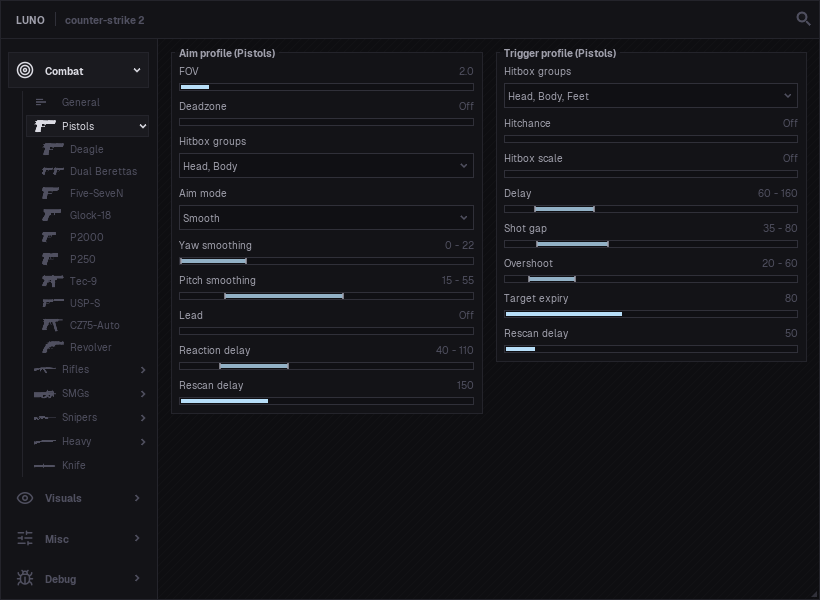
  • Aim profilePistols, rifles, SMGs, snipers, heavies and the knife each keep their own aim profile, and any single weapon can too.
  • Trigger profileThe same per-class and per-weapon split for trigger timing. Copy a profile off one gun and paste it onto another.
  • Override categoryLets a single weapon break away from its class and run its own settings.

Auto aim

  • EnabledTurns the aim assist on. It is bound to Mouse 1 out of the box, so it only helps while you hold the key.
  • Enemy onlyLeaves teammates alone and only ever pulls toward enemies.
  • Only while movingOnly kicks in while your mouse is already moving, so it nudges your aim rather than snapping from a standstill.
  • Ignore whileSit it out while you are flashed, when the target is behind smoke, or while they are mid-air.
  • Closest pointGoes for the nearest edge of the hitbox instead of dead center.
  • Scale FOV with zoomShrinks the aim cone once you are scoped in.
  • Switch after shotsAfter a few rounds it moves to a different hitbox set, so you can go head first then body through the spray.
  • Show FOVDraws the aim cone on screen in a colour you choose.
  • Show DeadzoneDraws the deadzone ring, colour up to you.
  • FOVHow far from your crosshair it is willing to reach, set per weapon.
  • DeadzoneA small dead spot at the hitbox center where it waits until the target drifts slightly off your aim.
  • Hitbox groupsPick what it is allowed to aim at: head, body, arms, legs or feet.
  • Aim modeSmooth eases you onto the target; Slowdown just drags on your mouse near one, like controller aim assist.
  • Yaw smoothingHorizontal smoothing range. Low is snappy, high is lazy.
  • Pitch smoothingVertical smoothing, set apart from the horizontal.
  • Slowdown strengthHow hard your mouse gets held back over a target in Slowdown mode.
  • LeadLeads strafing targets by their speed so you track with them instead of trailing behind.
  • Reaction delayWaits a randomized beat before locking onto someone new.
  • Rescan delayHow long it holds before going looking for the next target.

Auto trigger

  • EnabledTurns the trigger on. Bind it to hold, toggle or hold-off, and it only fires with a real target under your crosshair.
  • Enemy onlyWill not fire on teammates.
  • Ignore whileHold fire while you are blind, when the shot would pass through smoke, or while you are airborne.
  • Hitbox groupsOnly pulls the trigger when you are on the hitboxes you picked: head, body, arms, legs or feet.
  • HitchanceWill not shoot unless the spread simulation says it is likely enough to land.
  • Hitbox scaleGrow or shrink the hitbox the check uses to make it stricter or more forgiving.
  • DelayA randomized reaction delay before the shot so it is not instant.
  • Shot gapMinimum spacing between pistol taps.
  • OvershootKeeps firing for a brief moment after your crosshair slips off the target.
  • Target expiryHow long the last target stays valid.
  • Rescan delayCooldown after a shot before it looks for the next target.
  • Backstab onlyFor the knife, only swings when you are lined up for a backstab.

Recoil compensation

  • ActivationRun it alongside auto aim, on its own, or both at once.
  • Pitch strengthA min and max range for how hard the vertical part of the spray is pulled back down.
  • Yaw strengthA min and max range for correcting the sideways part of the spray.
  • SmoothingEases the correction in over time instead of applying it all at once.

Player ESP

  • EnabledDraw ESP on players. Enemies and teammates have their own separate, full configs.
  • Hide throughOptionally drop the ESP on anyone behind walls or inside smoke.
  • Reveal hidden on soundWhen a wall-hidden enemy makes noise, flash their ESP up for a few seconds. Enemies only.
  • Bounding boxA full or corner box around each player.
  • TextName, Steam avatar and distance above the box, each in a colour you pick.
  • WeaponWhat they are holding, as text, an icon, or both.
  • FlagsSmall tags: callout, armor, ping, zoom, kit, pin, hostage, money and blind.
  • GrenadesIcons of the nades a player is currently carrying.
  • SkeletonBones drawn over the player.
  • HealthA health bar that fades from your high colour to your low one.
  • AmmoHow many rounds are left in their mag.
  • Sound ringsExpanding rings wherever a player makes noise, tilted to sit flat on the surface.
  • ArmorTheir armor value as a bar.
  • Out of FOV arrowAn arrow pointing toward players off your screen, with size and range controls.
  • Crosshair fadeFades the ESP as it nears your crosshair so it does not clutter your aim.

Player model

  • EnabledTurn model chams on. Enemies and teammates are set up separately.
  • MaterialNone, textured, flat or toon, with separate colours for visible and occluded models.
  • PearlescentBlend in an iridescent, oil-slick sheen.
  • FresnelA rim-light edge glow, with its own visible and occluded colours.

Player outline

  • EnabledA glow outline around the model, with visible and occluded colours. Set per team.
  • StylesStencil for a crisp edge, blur for a softer halo.
  • Stencil thicknessHow thick the stencil outline sits around the model.

World & info

  • Dropped weaponsGuns on the ground, tagged with icon, name and leftover ammo.
  • Bomb timerThe planted C4 countdown, in 2D on your screen and in 3D out in the world.
  • Plant zoneOutlines the sites on the ground while you carry the bomb, fading up as you close in.
  • Defuse zoneThe defuse radius around a planted bomb.
  • Hostage ESPMarks hostages on hostage maps.
  • Grenade predictionTraces your throw: the arc, the bounces and where it lands.
  • Grenade timersCountdown timers for live decoys, flashbangs, HE, molotovs and smokes.
  • HitmarkerA marker and/or a sound when you land a shot, with a volume slider.
  • Spectator listSee who is currently watching you.
  • PurchasesA buy log of what players bought, with an enemy-only filter and prices.
  • Damage logsA running feed of the damage you deal and your kills.

Overlay

  • ThemeClassic, Minimal or Light.
  • AccentRecolour the whole UI to your accent.
  • Lock layoutPin the panels in place so you do not nudge them mid-game.
  • Stream proofHides the overlay from screen capture and recording.

Seen enough?